
Dietary Analysis with Bimi App: 2026 Guide


TL;DR:
Bimiapp uses AI to convert meal photos into detailed reports of over 60 nutrients, including vitamins and minerals. It improves dietary tracking accuracy through verified food databases, portion-weighting, and manual verification of complex meals. Consistent use with a kitchen scale and weekly micronutrient reviews helps users identify deficiencies and achieve health goals.
Dietary analysis with Bimi app is an AI-driven method that converts meal photos into detailed nutrient breakdowns across more than 60 nutrients, including vitamins, minerals, amino acids, and fatty acids. Bimiapp gives you a full picture of what you eat, not just calories and macros. Active users of nutrition tracking apps lose an average of 1.4 lbs per week through consistent logging. That number shows what happens when you stop guessing and start measuring. This guide explains how Bimiapp works, what affects accuracy, and how to get the most from every scan.
How does dietary analysis with bimi app work?
Bimiapp turns your phone camera into a nutrition analysis tool. The process is direct: capture a photo of your meal, let the AI identify each food item, and receive a full nutrient breakdown in seconds. Here is how the core workflow runs:
Capture your meal. Open Bimiapp and photograph your plate before eating. The AI uses image recognition to identify individual foods, estimate portion sizes, and pull data from verified national food databases. This step replaces manual search and entry for most common meals.
Review and confirm. The app presents a list of identified foods with estimated weights and nutrient values. You check each item, adjust portion sizes if needed, and confirm the log. AI-assisted image recognition reduces logging fatigue and improves long-term adherence, which is why this review step matters more than it looks.
Analyze your nutrients. Bimiapp displays your intake across macros, vitamins, minerals, and more. The Meals Vault stores your data locally so you can review trends, spot deficiencies, and generate reports over time. You can also use barcode scanning and food label scanning for packaged items, plus set meal reminders to stay consistent.
Optimized dietary tools require 31% fewer taps to log meals compared to baseline standards. Fewer steps mean less friction, and less friction means you actually log every meal instead of skipping the ones that feel like work.
Pro Tip: Use Bimiapp’s AI meal analysis features for home-cooked meals and switch to barcode scanning for packaged foods. This combination covers the widest range of meals with the least effort.

What affects accuracy in your dietary assessment?
Accuracy in dietary assessment depends on three factors: the quality of your food database, the precision of your portion inputs, and how you handle complex meals. Bimiapp addresses the first factor by pulling from verified sources. The second and third factors are on you.
Key accuracy pitfalls to avoid:
Vague portion measures. Describing a serving as “a handful” or “a bowl” introduces significant error. Tracking food weight in grams rather than household measures prevents 20–30% calorie underestimation. A kitchen scale is the single best tool you can pair with Bimiapp.
Over-relying on a single photo for mixed dishes. A stew, a burrito, or a restaurant salad contains ingredients the camera cannot fully see. Manual verification is necessary for complex meals to avoid miscalculation, even with strong AI assistance.
Ignoring database updates. Verified national food databases like USDA FoodData Central improve dietary tracking accuracy. Bimiapp’s integration with these sources keeps your nutrient data grounded in real food composition, not estimates.
Skipping micronutrient review. Most users check calories and protein but ignore Vitamin D, magnesium, and zinc. Detailed nutrient tracking beyond calories is necessary for long-term health. Bimiapp tracks all three, but only if you look at the data.
Scientific dietary assessment often requires multiple passes of entry for mixed dishes to reach reliable accuracy. Bimiapp’s review step is designed for exactly this. Spend 30 seconds confirming AI-identified items on complex meals and your data quality improves substantially.
Pro Tip: Log your meals immediately after eating, not at the end of the day. Memory-based logging for mixed dishes is one of the most common sources of error in any nutrition analysis tool.
How does bimi compare to other food tracking apps?
Bimiapp’s core advantage is nutrient depth combined with AI speed. Most food tracking apps stop at calories, protein, fat, and carbohydrates. Bimiapp tracks over 60 nutrients, including amino acid profiles, fatty acid breakdowns, and individual vitamins and minerals. That difference matters when you are trying to address a specific deficiency, not just hit a calorie target.
Feature | Bimiapp | Standard food tracking apps |
Nutrient tracking depth | 60+ nutrients including amino acids and fatty acids | Primarily macros and basic vitamins |
Logging method | AI photo recognition plus barcode and label scanning | Manual search, barcode scanning |
Logging efficiency | ~31% fewer taps than baseline | Baseline standard |
Personalization | Recommendations based on age, weight, BMI, activity level | Generic targets or user-set goals |
Meal data storage | Local Meals Vault with trend reports | Cloud-based logs, limited trend analysis |
Coaching features | AI-driven nutrient guidance | Basic calorie alerts or premium coaching add-ons |
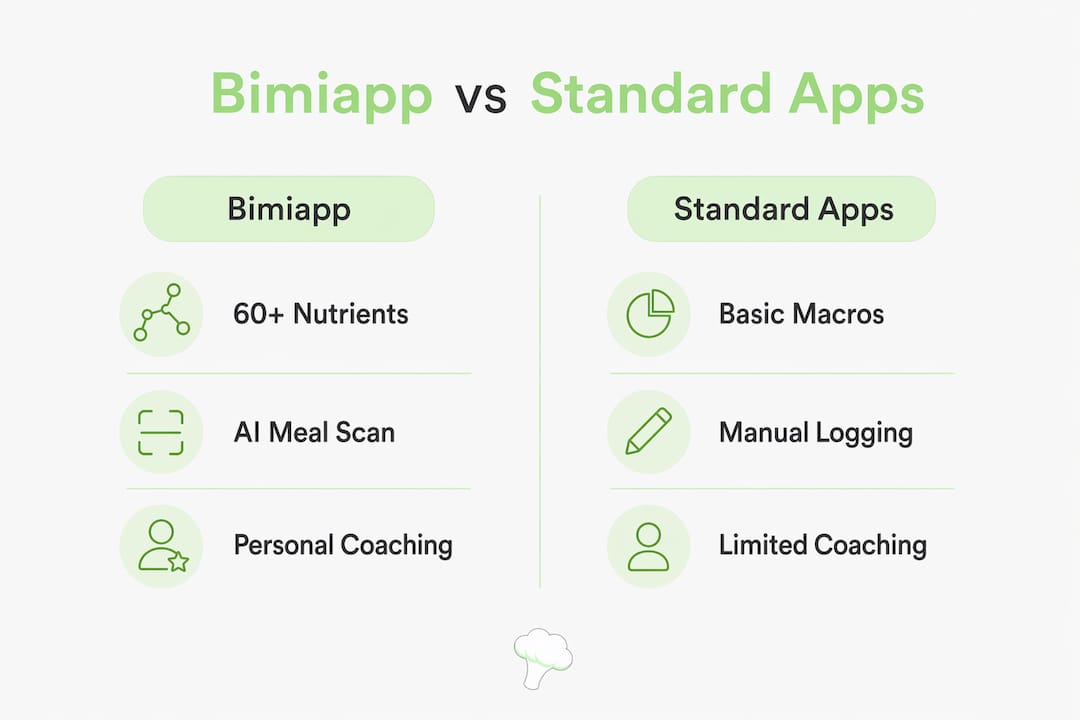
AI meal scanning combined with coaching features supports weight loss better than basic calorie counters. Bimiapp’s personalized recommendations adjust to your individual metrics, which means the guidance you receive reflects your actual body and activity level, not a generic population average.
The logging efficiency gap is real. When you reduce the number of steps to record a meal, you log more consistently. Consistent logging is what produces the results that show up on the scale and in your bloodwork.
Best practices for getting results with Bimiapp
Getting accurate data out of any diet planning app requires deliberate habits. These practices apply directly to Bimiapp and will improve both your data quality and your outcomes:
Weigh portions by grams. Use a digital kitchen scale for every home-cooked meal. Calorie counts are estimates based on databases, and gram-based measurements prevent undercounting by 20–30%. This single habit has the largest impact on accuracy.
Review your micronutrient panel weekly. Check your Vitamin D, magnesium, and zinc intake at least once a week inside Bimiapp. Most people discover deficiencies they did not know existed. Use the macronutrient analysis checklist as a companion resource to understand what each number means.
Verify AI scans on mixed dishes. Accept the AI identification as a starting point, not a final answer. Add missing ingredients manually for soups, stews, casseroles, and restaurant meals. This takes under a minute and prevents the most common accuracy errors.
Set meal reminders. Logging fatigue is a major barrier to consistent tracking. Apps with AI features reduce user burden, but reminders keep you on schedule. Set Bimiapp’s reminders for your three main meals until logging becomes automatic.
Use trend analysis to adjust your plan. Review your weekly and monthly nutrient trends inside the Meals Vault. If your iron intake consistently falls short, adjust your meal plan before it becomes a deficiency. Trend data turns reactive tracking into proactive diet planning.
Update your personal metrics regularly. Bimiapp personalizes recommendations based on your age, weight, BMI, and activity level. Update these figures every four to six weeks, especially if your weight or activity changes. Stale inputs produce stale recommendations.
Key takeaways
Consistent, gram-level logging with Bimiapp’s AI photo recognition and 60-plus nutrient tracking is the most direct path to accurate dietary analysis and measurable health results.
Point | Details |
AI photo recognition speeds up logging | Bimiapp converts meal photos to nutrient data, cutting interface steps by roughly 31%. |
Gram-based portions prevent undercounting | Weighing food by grams avoids 20–30% calorie underestimation common with household measures. |
Nutrient depth sets Bimiapp apart | Tracking 60+ nutrients, including Vitamin D, magnesium, and amino acids, reveals deficiencies basic apps miss. |
Manual verification improves complex meal accuracy | AI scans are a starting point; confirm mixed dishes manually to avoid miscalculation. |
Trend analysis drives plan adjustments | Weekly review of the Meals Vault turns raw data into decisions that improve your diet over time. |
Why consistent tracking beats perfect tracking
I have watched people abandon food tracking apps within two weeks because they set an impossible standard: every entry must be perfect. That standard is the enemy of progress. The apps that produce real results are the ones you actually use every day, not the ones with the most features you never open.
What I find genuinely different about Bimiapp is the nutrient depth paired with a low-friction logging process. Most health apps for diets give you a calorie number and leave you to figure out the rest. Bimiapp shows you that your magnesium is consistently low, or that your omega-3 intake drops every weekend. That specificity changes behavior in a way that a calorie deficit number never does.
The verification step for complex meals is not a flaw in the system. It is the system working correctly. Scientific dietary assessment requires multiple passes for mixed dishes to reach reliable accuracy. Bimiapp builds that step into the workflow rather than hiding it. Users who engage with that step get better data. Users who skip it get fast data. Fast data that is wrong is worse than no data at all.
My honest recommendation: use Bimiapp for 30 days with a kitchen scale and the weekly micronutrient review habit. The nutrient tracking methodology will show you patterns in your diet that you cannot see any other way. That visibility is where real dietary change begins.
— Alvi
Start your dietary analysis with Bimiapp today
Bimiapp gives you a direct path from meal photo to full nutrient report in seconds. The AI handles identification, the verified databases handle accuracy, and the Meals Vault handles your history.
Visit Bimiapp’s how-it-works page to see the full feature set and start logging your first meal. If you want to understand what your body is actually getting from your food, including the nutrients most apps never show you, Bimiapp is built for exactly that. Head to Bimiapp to get started now.
FAQ
What is dietary analysis with the bimi app?
Dietary analysis with Bimiapp is the process of using AI photo recognition and a verified food database to track over 60 nutrients from your meals. The app converts meal photos into detailed nutrient data covering macros, vitamins, minerals, amino acids, and fatty acids.
How accurate is bimiapp’s food tracking?
Accuracy depends on portion precision and meal complexity. Weighing food in grams prevents 20–30% calorie underestimation, and manually verifying complex or mixed dishes corrects the most common AI scanning errors.
How does Bimiapp differ from basic calorie counter apps?
Bimiapp tracks 60-plus nutrients compared to the four or five macros most basic apps cover. It also provides personalized recommendations based on your age, weight, BMI, and activity level rather than generic population targets.
Can Bimiapp help with micronutrient deficiencies?
Yes. Bimiapp monitors individual vitamins and minerals including Vitamin D, magnesium, and zinc. Weekly review of your micronutrient panel inside the app reveals consistent shortfalls before they become health problems.
How do i log meals quickly with Bimiapp?
Capture a photo of your meal, review the AI-identified items, adjust portion sizes if needed, and confirm. For packaged foods, use the barcode or food label scanner. Setting meal reminders keeps logging consistent without relying on memory.
Recommended
Comments