
How to Personalize Nutrient Targets for Your Goals


TL;DR:
Personalizing nutrient targets involves adjusting established dietary guidelines based on individual factors like age, sex, health conditions, and goals. Using the Dietary Reference Intakes as a foundation, tools like Bimiapp help users create and track personalized nutrient plans that reflect real-life needs. Regular updates and lab data integration are essential for maintaining accurate, effective nutrition targets over time.
Personalizing nutrient targets means adapting established dietary guidelines to fit your specific age, sex, health conditions, fitness goals, and food preferences. Generic nutrition labels give you a rough baseline, but they are built around an average adult eating 2,000 calories per day. That average rarely matches your reality. The science-backed starting point for setting individualized nutrient plans is the Dietary Reference Intakes (DRIs), a framework developed by the Food and Nutrition Board and updated by the USDA. From there, you layer in your personal context. Tools like Bimiapp make that layering practical and trackable.
How to personalize nutrient targets using DRIs as your foundation
Dietary Reference Intakes are the scientific baseline for all personalized nutrition work. The DRI framework includes four distinct values, and knowing which one applies to your situation changes how you set your targets.
RDA (Recommended Dietary Allowance): The daily intake level that meets the needs of 97–98% of healthy people in a specific age and sex group. Use this as your primary target for most nutrients.
AI (Adequate Intake): Used when there is not enough data to set a firm RDA. For nutrients like potassium and fluoride, meeting the AI/02%3A_Achieving_a_Healthy_Diet_and_Nutrition_Tools/2.01%3A_Understanding_Dietary_Reference_Intakes) on average is the goal, not hitting an exact number.
UL (Tolerable Upper Intake Level): The maximum daily intake that is unlikely to cause harm. This is your safety ceiling, especially relevant when supplementing.
AMDR (Acceptable Macronutrient Distribution Range): The percentage range of total calories from protein, fat, and carbohydrates associated with reduced chronic disease risk.
The DRI values shift significantly by life stage. An adult woman aged 19–50 has a different iron RDA than a postmenopausal woman. A teenage male has higher zinc needs than a 60-year-old man. DRIs are updated roughly every five years to reflect new research, so the category you fall into today may have updated values from what you last checked.
The Daily Values (DVs) printed on food labels are not the same as DRIs. DVs are based on a single generic adult profile and do not account for your age, sex, or calorie needs. Relying on label percentages alone will not give you a personalized picture.
DRI Component | Purpose | How to use it |
RDA | Target for most nutrients | Set as your daily goal |
AI | Estimate for under-researched nutrients | Aim to meet or exceed on average |
UL | Safety ceiling | Do not exceed when supplementing |
AMDR | Macronutrient ratio guidance | Use to balance protein, fat, carbs |
How to adjust nutrient targets based on your individual needs
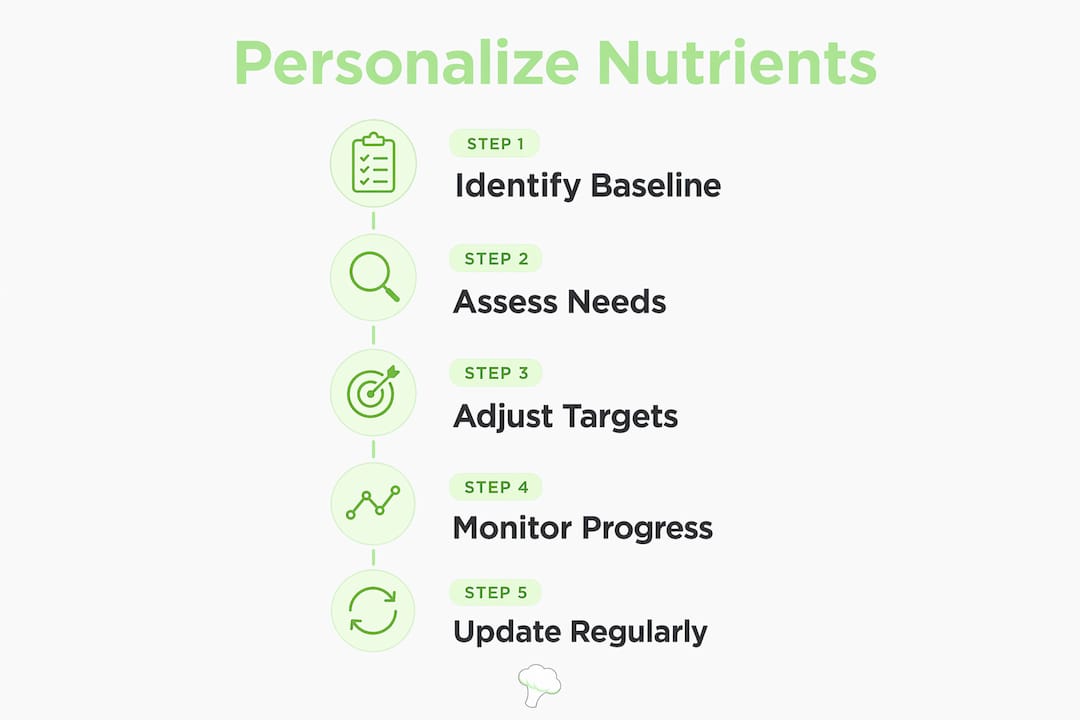
Starting with the right DRI category gets you close. Getting precise requires adjusting for your personal context. Personalization maps your individual health status, lifestyle, and goals onto the correct DRI category, then modifies from there.

Health conditions change your targets in specific, documented ways. People with iron-deficiency anemia need higher iron intake than the standard RDA. Those with kidney disease often need to lower potassium and phosphorus. Anyone on medications like metformin, proton pump inhibitors, or corticosteroids may have altered absorption for B12, magnesium, or calcium. Always check with a healthcare provider before making clinical adjustments.
Fitness goals shift your macronutrient distribution and some micronutrient needs. Weight loss goals typically call for a calorie deficit with higher protein to preserve muscle. Muscle gain requires increased protein and total calorie intake. Endurance athletes need higher carbohydrate targets and pay close attention to electrolytes like sodium, potassium, and magnesium. Check your micronutrient needs when training volume increases, since deficiencies in iron, vitamin D, and zinc are common in active people.
Dietary preferences create predictable gaps. Vegans and vegetarians commonly need to watch B12, iron, zinc, calcium, and omega-3 fatty acids. Keto dieters often need to increase sodium, potassium, and magnesium due to reduced carbohydrate intake. People with food allergies may miss entire nutrient categories depending on what they avoid.
Adjust protein targets upward for muscle gain or high activity levels
Raise iron targets if you are a menstruating woman or follow a plant-based diet
Increase calcium and vitamin D if you avoid dairy
Monitor B12 closely on any restrictive diet
Keep all supplemented nutrients below their UL to avoid excessive intake/06%3A_Evaluation_of_intakes_and_diets_(Chapter_8b)/6.04%3A_Using_the_NRVs_for_planning_nutritious_diets_(8b.4))
Pro Tip: Before adjusting any target related to a health condition or medication, get a baseline blood panel. Lab results for ferritin, vitamin D, B12, and magnesium give you real data instead of estimates.
How to set and customize nutrient goals in Bimiapp
Bimiapp is built specifically for this kind of detailed, individualized work. The app tracks over 60 nutrients, including amino acids, vitamins, minerals, and fatty acids, and lets you customize targets dynamically based on your profile data.
Here is how to set up and personalize your targets in Bimiapp:
Create your profile. Enter your age, sex, weight, height, and activity level. Bimiapp uses these inputs to generate a starting set of nutrient recommendations calibrated to your DRI category. This replaces the generic 2,000-calorie baseline immediately.
Review your generated targets. The app displays recommended ranges for macronutrients and key micronutrients. Check each target against your personal context. If you are a 35-year-old active woman, your iron and calcium targets will already differ from a male profile of the same age.
Edit individual nutrient targets. Bimiapp lets you manually adjust any nutrient range. If your doctor has recommended higher vitamin D or lower sodium, edit those values directly in the app settings. You can switch between profiles if your needs change seasonally or after a health update.
Log your meals and track intake. Use the AI photo recognition feature to capture meals quickly. The app estimates portion sizes and calculates your nutrient intake against your custom targets in real time. Check your daily summary to see which nutrients you are hitting, falling short on, or exceeding.
Review trends and refine targets. The Meals Vault stores your meal history so you can spot patterns over weeks. If you consistently fall short on magnesium or exceed your sodium target, adjust your diet or your target range accordingly.
Pro Tip: Use Bimiapp’s profile switching feature if you are tracking nutrition for different phases, such as a training block versus a recovery period. Your targets should shift with your activity level.
Feature | What it does | Why it matters |
Profile setup | Inputs age, sex, weight, activity | Generates DRI-calibrated starting targets |
Target editing | Manual adjustment of any nutrient | Lets you apply clinical or personal context |
AI food logging | Photo recognition and portion estimation | Speeds up accurate daily tracking |
Meals Vault | Stores meal history and trends | Reveals patterns for ongoing refinement |
Common mistakes when personalizing and maintaining nutrient targets
The most frequent error is treating food label DVs as personal targets. DVs do not reflect your age, sex, or calorie needs. A 45-year-old woman eating 1,600 calories per day has very different targets than the generic adult the label assumes.
The second most common mistake is ignoring the UL when supplementing. Many people add supplements without checking whether their total intake from food plus supplements crosses the safety ceiling. Proper nutrition planning/06%3A_Evaluation_of_intakes_and_diets_(Chapter_8b)/6.04%3A_Using_the_NRVs_for_planning_nutritious_diets_(8b.4)) requires keeping total intake between the adequacy target and the UL, not just above the RDA.
Personalized targets are not permanent. Revisit them when your weight changes significantly, when you start or stop a medication, after a blood test, or when your fitness goals shift. Targets set six months ago may no longer fit your current situation.
Other pitfalls to avoid:
Setting targets based on a single day of tracking rather than a weekly average
Ignoring medication interactions that reduce absorption of B12, magnesium, or iron
Copying someone else’s macro split without adjusting for your own calorie needs and body composition
Skipping micronutrient targets entirely and only tracking macros
What tools and resources support personalized target setting?
Beyond Bimiapp, several resources help you build and refine your individualized nutrient plans. The USDA’s DRI calculator provides age and sex-specific reference values at no cost. The NIH Office of Dietary Supplements publishes detailed fact sheets for individual nutrients, including RDAs, AIs, and ULs by life stage.
Nutritional biomarker testing adds a layer of precision that no calculator can match. A standard blood panel covering vitamin D (25-OH), ferritin, B12, magnesium, and a complete metabolic panel gives you real absorption data. Individual absorption differences and health conditions affect real nutrient needs beyond what DRIs predict, and lab results close that gap.
Registered dietitians (RDs) are the right clinical resource when health conditions complicate your targets. An RD can interpret lab results, account for drug-nutrient interactions, and set targets that a general app or calculator cannot safely provide. For general education, the nutritional analysis methods used in 2026 show how technology and clinical practice are converging to make personalized nutrition more accessible.
Tracking apps that support nutrient goal customization are most effective when paired with periodic lab reviews. Technology tracks behavior; labs confirm biology.
Key Takeaways
Personalizing nutrient targets requires starting with DRI-based baselines, adjusting for your individual health and goals, and refining those targets over time with real intake data and lab results.
Point | Details |
Start with DRIs | Use your age and sex-specific RDA, AI, UL, and AMDR as your baseline framework. |
Avoid label DVs | Food label Daily Values are generic and do not reflect your personal calorie needs or life stage. |
Adjust for your context | Health conditions, fitness goals, and dietary preferences all require specific target modifications. |
Use Bimiapp to customize | Edit individual nutrient targets in Bimiapp after entering your profile data for real-time tracking. |
Refine with lab data | Blood panels for vitamin D, B12, ferritin, and magnesium confirm whether your targets are working. |
Why I think most people personalize nutrition backwards
Most people I see approach this process in reverse. They pick a diet plan first, then try to make their nutrient targets fit it. That is the wrong direction. The evidence-based approach starts with your biology, specifically your DRI category, your lab results, and your health history, and then builds a diet around those numbers.
The other thing I have noticed is that people treat their first set of personalized targets as final. They are not. Personal nutrient targets are flexible baselines that need regular revision. A target that made sense during a high-training phase will not serve you during recovery. A target set before a diagnosis needs to change after one.
What excites me about tools like Bimiapp is that they make iteration practical. You do not need a dietitian appointment every time your activity level shifts. You edit your profile, check your trends in the Meals Vault, and adjust. The future of this space is integrating biomarker data directly with app-based tracking, so your targets update based on actual blood values, not just self-reported inputs. We are not fully there yet, but the direction is clear. Start with the science, use the tools available now, and build the habit of revisiting your targets every few months. That cycle of assess, adjust, and track is what actually produces results.
— Alvi
Bimiapp’s personalized nutrition features, explained
Bimiapp gives you a practical way to move from generic guidelines to targets that actually fit your life. After you enter your age, sex, weight, and activity level, the app generates a starting set of nutrient recommendations calibrated to your profile. From there, you can edit any individual target, whether that is raising your vitamin D goal based on a lab result or lowering sodium for a clinical reason.
The app tracks over 60 nutrients in real time, uses AI photo recognition to log meals quickly, and stores your history in the Meals Vault so you can spot trends over weeks. Whether your goal is weight loss, muscle gain, or addressing a specific deficiency, Bimiapp adapts to your targets rather than forcing you into a preset plan. See how Bimiapp works to set up your personalized nutrition profile today.
FAQ
What are DRIs and why do they matter for personalization?
Dietary Reference Intakes are science-based nutrient targets set by the Food and Nutrition Board, organized by age, sex, and life stage. They are the correct starting point for setting personalized nutrition targets because they already account for demographic variation.
How is personalizing nutrient targets different from following food label DVs?
Daily Values on food labels are based on a generic 2,000-calorie adult and do not reflect your age, sex, or health status. Personalized targets use your specific DRI category and adjust further for your individual context.
Can I personalize my nutrient targets in Bimiapp without a dietitian?
Yes. Bimiapp lets you enter your personal profile data and manually edit individual nutrient targets based on your goals or clinical guidance. For targets related to diagnosed health conditions, confirm adjustments with a healthcare provider.
How often should I update my personalized nutrient targets?
Revisit your targets after significant weight changes, new lab results, a change in medication, or a shift in fitness goals. Static targets set months ago may no longer match your current needs.
What nutrients are most commonly under-targeted in personalized plans?
Magnesium, vitamin D, potassium, and B12 are frequently under-targeted, especially in people following restrictive diets or taking certain medications. A nutritional balance assessment can help identify gaps before they become deficiencies.
Recommended
Comments